The Underlying-Form
In many languages, morphophonology is too complex for a rule-based parser to always recover the “right” segmentation of a surface word into morphemes,even when stem and affix variants are carefully modeled. Underlying forms solve this by allowing each input word to have a stored analysis, defined as a sequence of existing lexicon entries. Because underlying forms are defined in terms of lexicon entries that already exist. ELAN can use your underlying form during interlinearization.
Figure 385. Add Underlying-Form dialog
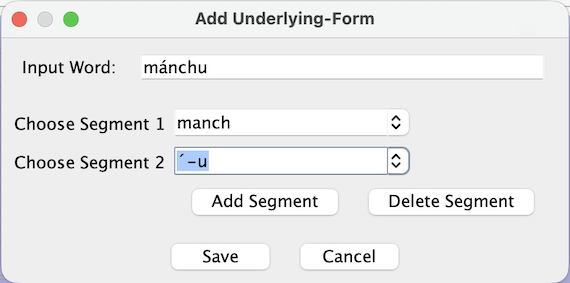 |
Input – The Input label and text field show the input unit for which you are defining an underlying form.
Segments – With “Segment 1”, “Segment 2”, etc, you select one lexicon entry per row to build the underlying form as a sequence of existing entries.
: adds a new segment row to the dialog.
: removes the last segment row.
Using underlying forms during interlinearization – Once an underlying form has been defined for an input word, analyzers and the interlinearization editor can make use of this information when creating interlinearized annotations. When you interlinearize a word that has an underlying form, the analyzer may segment the word into morphemes according to the sequence of lexicon entries stored in the underlying form.
When underlying forms have been defined for an input with this dialog, and in the Lexicon anlayzer the option is enabled, ELAN uses stored underlying forms as the exclusive source of parse suggestions for tokens that have such forms defined. In that case, normal parsing is skipped for those tokens.
![[Note]](images/note_1855015319.png) | Note |
|---|---|
Protecting underlying forms – If you open an annotation
document in an ELAN version earlier than 7.1 and accept analyzer suggestions there, the
underlying-forms data created in newer versions may be lost. To protect this data, it is a
good idea to make a backup copy of your |