Time Co-reference Tab-delimited text
This function is available via menu ->-> .
A common requirement is to export data in a tabular format that can be opened in a spreadsheet program or used in another environment such as R or Python. ELAN has a standard export option for this task called ‘Tab-delimited Text’. However, where the focus is on capturing data which co-occurs, temporally, with annotations on a specific tier, the arrangement of the data is unsuitable.
The variant ‘Time Co-reference Tab-delimited text’ export option addresses this issue. It produces a file where each row is an instance of an annotation in a specific reference tier, and each column provides data related to, or co-occurring with, that annotation, according to the timecode.
In short, this option is intended for analysis, qualitative and quantitative, of temporal co-occurrence of phenomena with regard to a particular focus. For example, a research question might be: “What is the range of the elements of ‘Tier A’ that are associated with annotations on ‘Tier X’?”
This function allows the user to select either a single file or the collection of files within a domain. The dialog box presents the following steps:
Figure 175. Select files, tiers and Concatenation separator
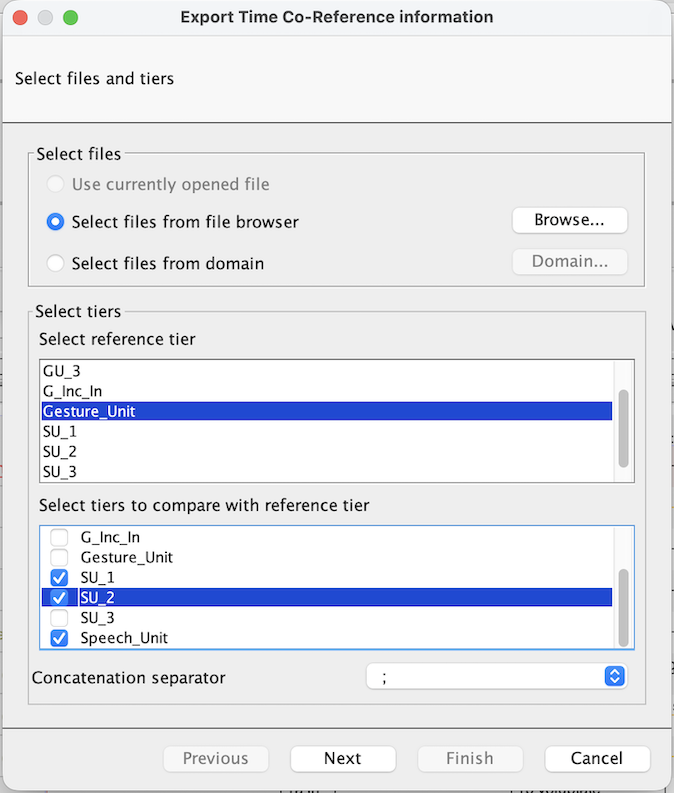 |
First a reference tier is chosen that reflects the focus of the data enquiry.
Then, other tiers are selected according to what supplementary, co-occurring, information is required.
Next a ‘Concatenation separator’ is chosen. (The default is a semi-colon, but almost anything is possible – including multi-character strings – using the ‘Custom’ option.) The purpose of this is to indicate the boundaries between individual annotations in the cases where multiple annotations on a particular tier are captured.
The output file: After these steps, the output is saved to a tab-delimited text file with a ‘.txt’ extension. (This format is commonly referred to as ‘tab-separated values’, or TSV. Often it is useful to rename the extension to ‘.tsv’ since this can help other programs to parse the format.) The output file comprises:
One ‘row’ (i.e. new line) per reference tier annotation.
A number of ‘columns’ (i.e. strings of data, separated by tab characters), including:
A column for the name and path of the source file (‘File name’).
Five columns for data related to the reference tier:
‘Begin time’.
‘End time’.
‘Duration’.
The annotation value .
The ‘Participant’ (if defined, otherwise empty).
A column for each of the chosen extra tiers containing the corresponding annotation value .