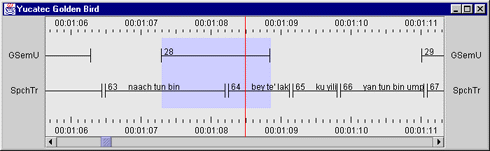
Time line view is a bit different from other viewers in the sense that is represents tags from multiple tiers in one view. Each tag is shown as a bar, where the horizontal position and length of the bar indicates the tag's begin time and duration. The tag's values are only represented by the beginning of the value of the tag's first field. Pressing the 'popup button' (the right mouse button on most systems) displays a tag panel with all fields.
The vertical order of the tiers can be changed simply by dragging the tier's name label to the proper position.
The current time is represented by a red cross-hair in the middle of the view. When playing the tag bars scroll horizontally, always reflecting the proper media time. Scrolling in this viewer using the scroll bar changes the current time in all other viewers as well.
Selecting and setting the cursor is similar to the way this is done in other viewers.