Fieldworks Language Explorer (FLEx) file
ELAN can import documents from the SIL Fieldworks Language Explorer (FLEx). This involves a few steps:
Click . Select the
.flextextfile and relevant media files by clicking the -buttons.In the import window select the
.flextextfile exported from FLEx. Optionally also add media files here (if not already in your.flextextfile). There are several options to customize the import:Include "interlinear-text" element: the top-levelinterlinear-textelement can contain a title and other information. If selected, these will be converted to one or more tiers.Include "paragraph" element: a text may contain multipleparagraphelements, each containing one or morephrases. If selected, this option allows to ignore theparagraphlayer when importing.Import participant information from "Note" field: if the FLEx file contains anoteitem type containing the name or code of the participant/spaeaker, this option makes that it will be stored in a tier'spartipantattribute.Smallest time-alignable element: when thewordelement is selected here, the time-alignment for that level will be lost when exported again from ELAN to FLEx. In.flextexttime alignment is stored on thephraselevel.Specify the top-level "phrase" item type: by default the<item type="txt">...</item>child element is converted to the parent tier of each level. Here it is possible to specify an alternative for thephraselevel, e.g.segnum.Use the "speaker" attribute as tier prefix: by default tier hierarchies for different speakers in the file are prefixed in ELAN withA, B, Cetc. This option allows to specify that the contents of thespeakerattribute of aphraseelement should be used instead. Note that this can interfere with the conversion, the encoding and decoding, from tier name to.flextextelement.
It is possible to have tier types created simply for all major elements (
phrase,word,morphetc.) or, more fine-grained, for each combination of major element plusitem typeup to a combination of major element, the type and the language.Finally, set a duration per
phraseelement in milliseconds. This has to be set if the FLEx export files do not contain timestamps. When importing a FLEx file that was edited in ELAN before and exported as a.flextextfile, time duration information has already been stored in the file.
Figure 68. Import FLEx file
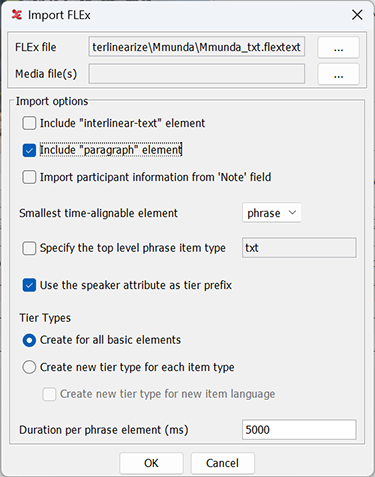 |
Figure 69. FLEx to ELAN structure
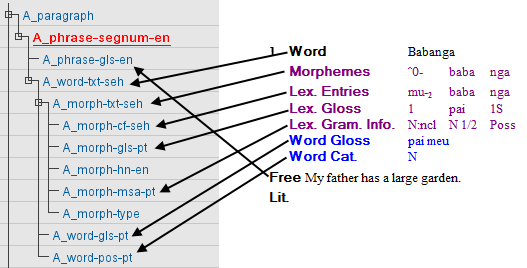 |
The tier structure created after import in ELAN is roughly like in the example above. The mapping of the FLEx structure onto ELAN tiers follows the schema: <Speaker>_<element>-<item-type>-<language> Where the Speaker prefix is a generic label (A, B, C, ...).
FLEx tiers and their representation in .flextext:
| Word | <word> | <item type=”txt”> |
| Morphemes | <morph> | <item type=”txt”> |
| Lex. Entries | <morph> | <item type=”cf”> |
| <morph> | <item type=”hn”> | |
| Lex. Gloss | <morph> | <item type=”gls”> |
| Lex. Gram. | <morph> | <item type=”msa”> |
| Word Gloss | <word> | <item type="gls"> |
| Word Cat. | <word> | <item type=”pos”> |
![[Note]](images/note_1855015319.png) | Note |
|---|---|
On the third-party resources page of ELAN (https://archive.mpi.nl/tla/elan/thirdparty ), you can find a workflow description covering importing from FLEx to ELAN and back to FLEx. |